2009-05-27

Analysis of Adobe RTMPE


A recently published analysis of RTMPE comes to the conclusion that, although the algorithm "provides end-to-end secrecy in exactly the same way that SSL provides end-to-end secrecy, it provides no security and uses no authentication of any kind." Nowhere is a secret key, a password or even a pass phrase required in order to decrypt the content: only a 32-byte hash value plus the size of the SWF file and publicly exchanged information, specifically the last 32 bytes of the first response from the streaming server, are involved.

Following this line of argument, it could be concluded that RTMPE is only a proprietary streaming protocol with encrypted transmission. It seems at least questionable whether Adobe could call this a circumvention of copy protection and thus be in a position to invoke the DMCA and prevent distribution of the software.

http://www.h-online.com/open/Adobe-acts-against-Flash-video-stream-recorder--/news/113370

2009-05-16

Windows7 UAC whitelist: code-injection vulnerability (and more)

And when I thought the RC for Windows 7 is going to be a hit, it turns out that while running an administrative account, most of original Windows 7 .exe's auto-eleviate their rights by default, without asking user for a permission. Given that many people are accustomed to run on administrative accounts, this poses a security hole.

More: http://www.pretentiousname.com/misc/win7_uac_whitelist2.html

Enable Alt+Ctrl+Backspace in Jaunty Jackalope

Ubuntu 9.04 comes with updated X.org server, in which Ctrl+Alt+Backspace doesn't work anymore out of the box. Some silly users complained that this (correctly!) resets their sessions, when they accidentally press the aforementioned combination. Even though I used Linux for many years with success, I was NEVER able to press such extraordinary key combo accidentally.

Anyway, Ubuntu devs listened and Ctrl+Alt+Backspace is turned off by default, what a pity. To restore the normal (old?) behaviour you need to modify X.org settings:

1) Open the configuration file in Gedit:

sudo gedit /etc/X11/xorg.conf

2) At the end paste:

Section "ServerFlags"
Option "DontZap" "false"
EndSection

3) Restart the system or just the X subsystem ("sudo /etc/init.d/gdm restart" comes to mind) in order for Ctrl+Alt+Backspace to work again. To return to previous setting, remove or comment out added lines, or change "false" to "true" in "DontZap" flag.

Original tip (in Polish): http://www.ubucentrum.net/2009/05/jak-waczyc-skrot-ctrlaltdelete-w-ubuntu.html

2009-05-05

No One Ever Got Fired For Using Microsoft

I dug out a nice writing by helios, from his old blog. Actually this is one of the best his posts that hook me up into reading them. And they are numerous...

http://blog.lobby4linux.com/index.php?/archives/83-No-One-Ever-Got-Fired-For-Using-Microsoft.-Yes-They-Did..html
(note: original site is inaccessible right now, the above link is provided by the Wayback Machine)

Find more interesting readings on the current Blog of helios.

2009-03-19

pv (Pipe Viewer) in action!

Recently I needed to copy a 4GB of data to a 6GB partition (both of which were VirtualBox disks). Remembering my resolution to use pv program (pipe viewer) in such case, I used it this time while copying to see the progress of the whole process. I started with getting the expected size of copied data:
# fdisk -l -u

Disk /dev/sda: 4294 MB, 4294967296 bytes
255 heads, 63 sectors/track, 522 cylinders, total 8388608 sectors
Units = sectors of 1 * 512 = 512 bytes
Disk identifier: 0x664a0e1b

Device Boot Start End Blocks Id System
/dev/sda1 * 63 8369864 4184901 7 HPFS/NTFS

Disk /dev/sdb: 6442 MB, 6442450944 bytes
255 heads, 63 sectors/track, 783 cylinders, total 12582912 sectors
Units = sectors of 1 * 512 = 512 bytes
Disk identifier: 0x00000000

Disk /dev/sdb doesn't contain a valid partition table

Next, after consulting the pv's manual, I used it as a filter between two dd programs (one for reading from the source and one for writing to the destination). I played a bit with pv's -B option (which specifies the size of internal buffer), but it turned out the default size was the best. Anyway, the progress I achieved looked like this:

# dd if=/dev/sda bs=4096 | pv -pterb -s 4294967296 -B 4096 | dd of=/dev/sdb bs=4096
35.5MB 0:00:20 [1.61MB/s] [> ] 0% ETA 0:41:38
8469+0 records in
8468+0 records out
34684928 bytes (35 MB) copied, 20.6268 s, 1.7 MB/s
8451+0 records in
8451+0 records out
34615296 bytes (35 MB) copied, 20.6437 s, 1.7 MB/s

Pretty neat IMHO, just what I wanted. Now I only need to remember the parameters for another use: "pterb" for progress, and "-s" for size...

2009-02-28

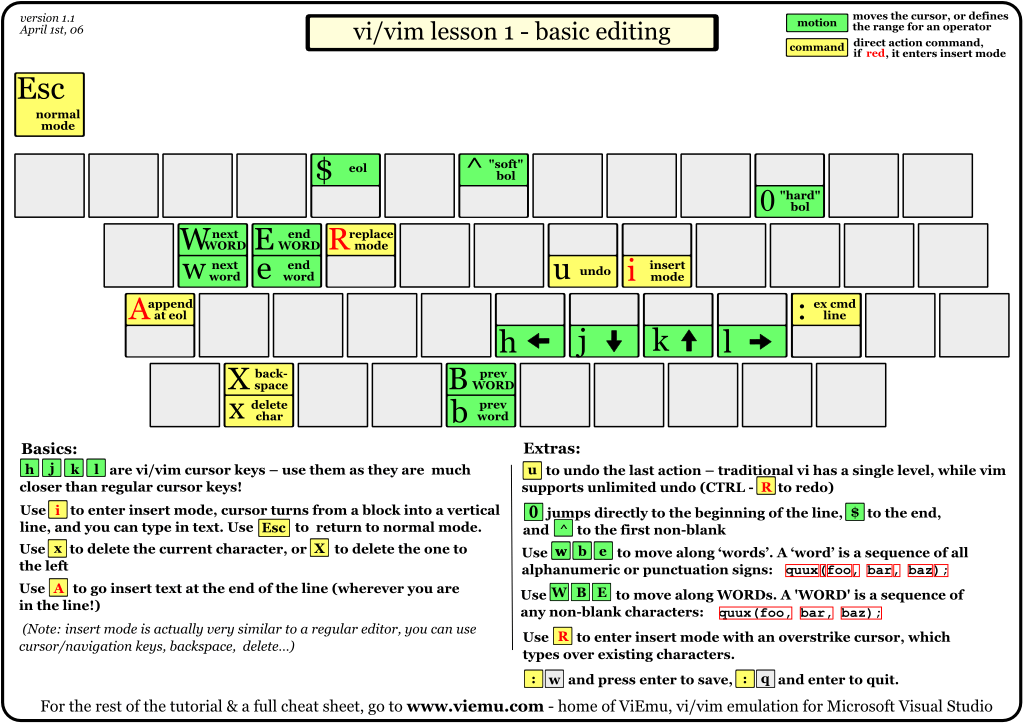
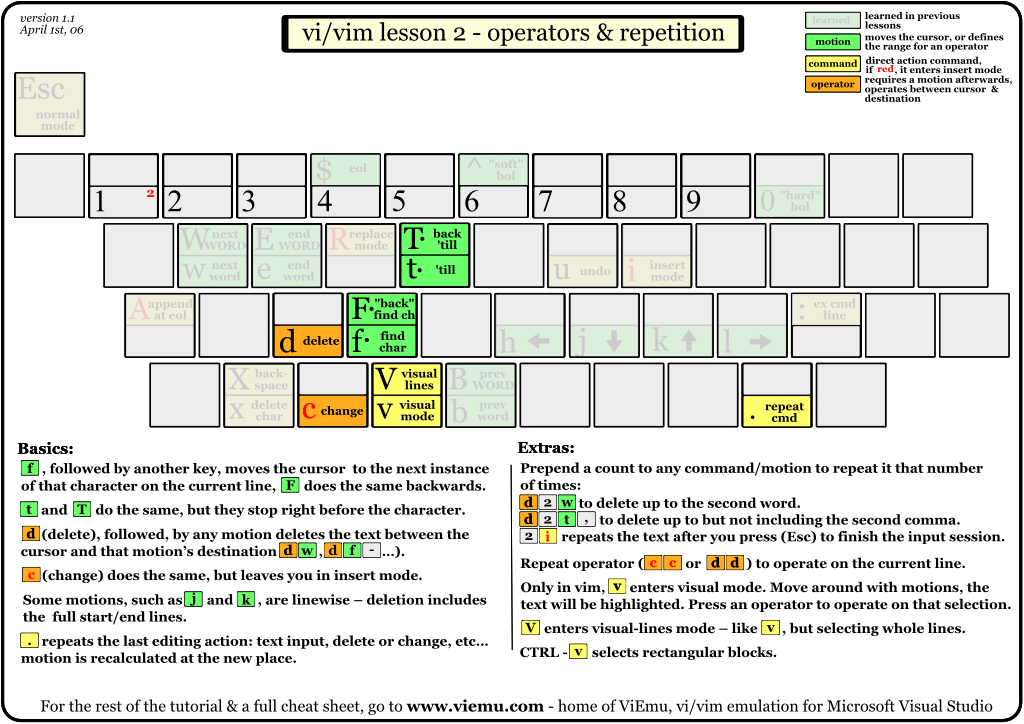
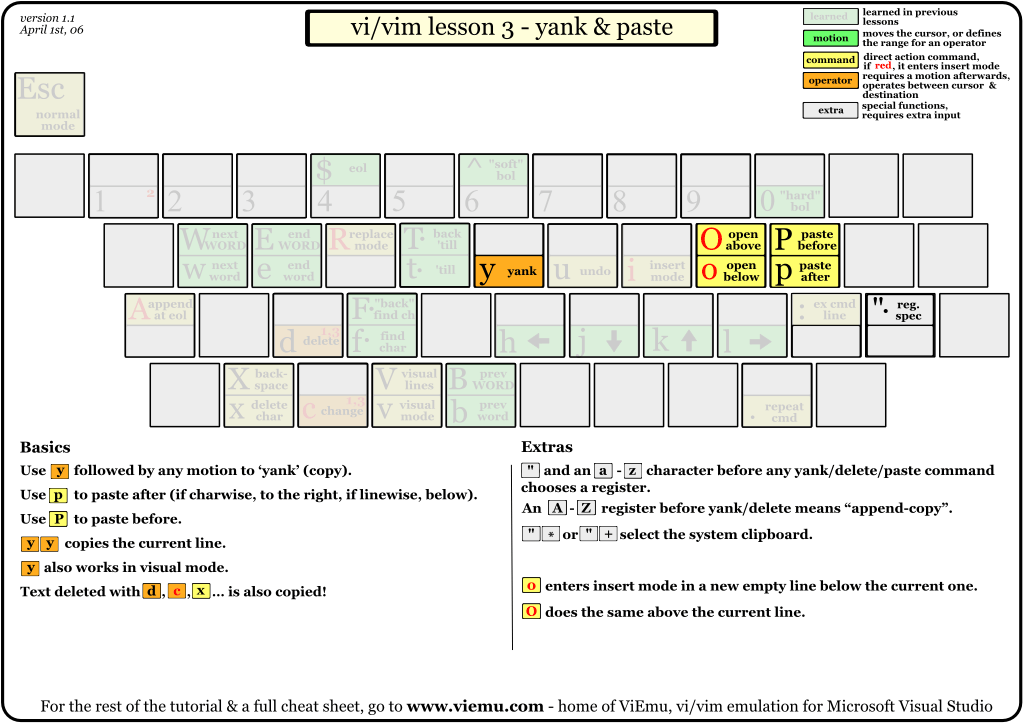
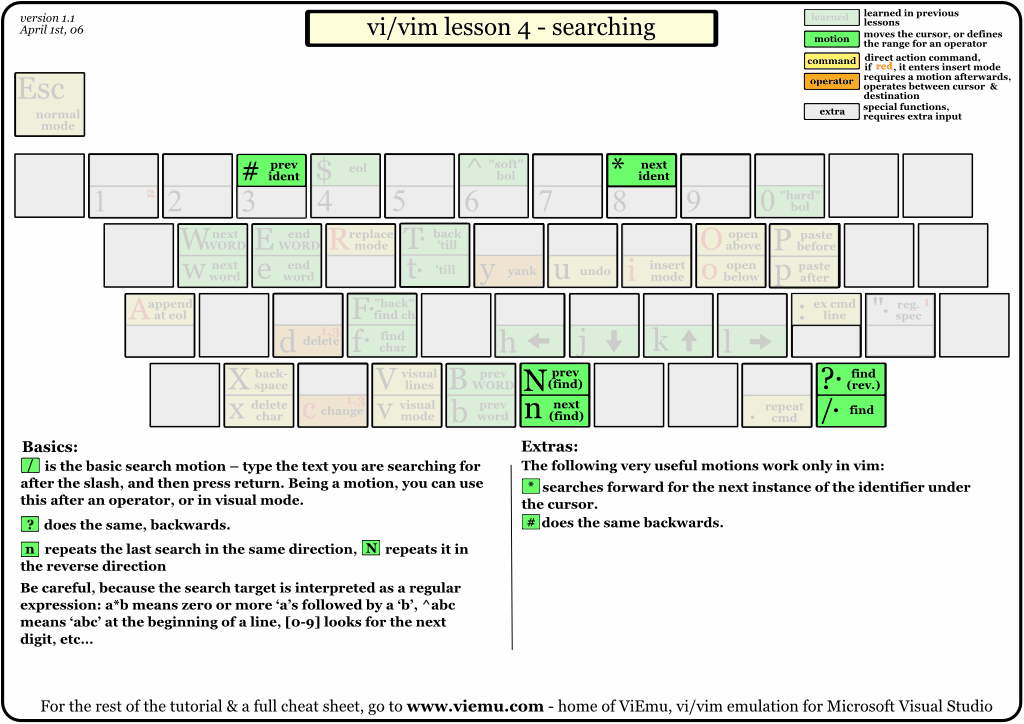
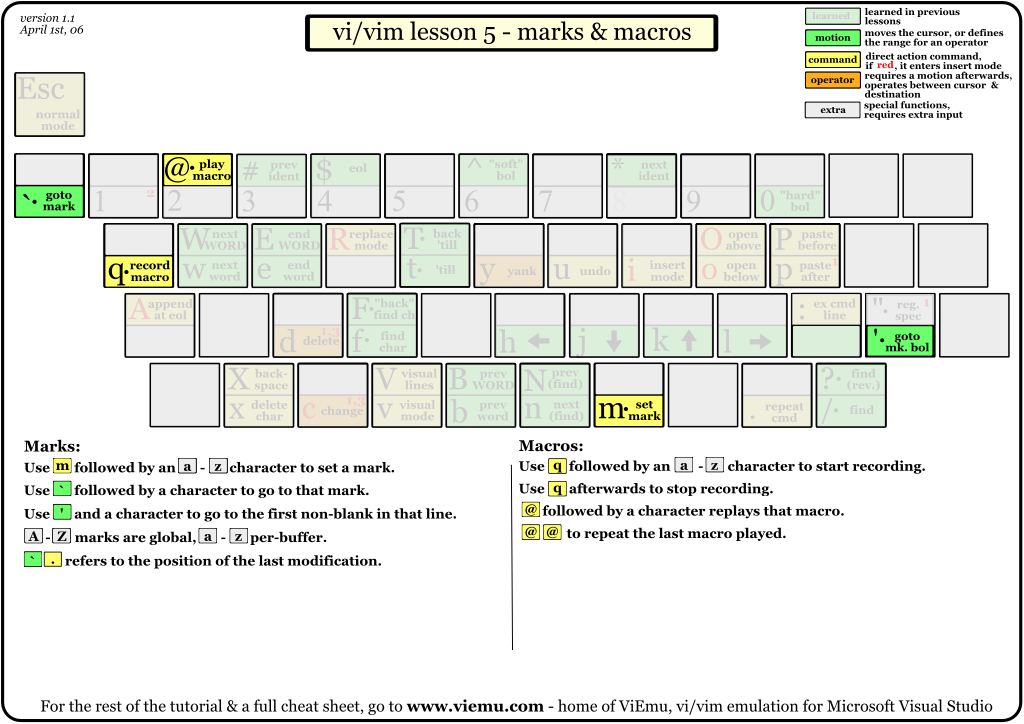
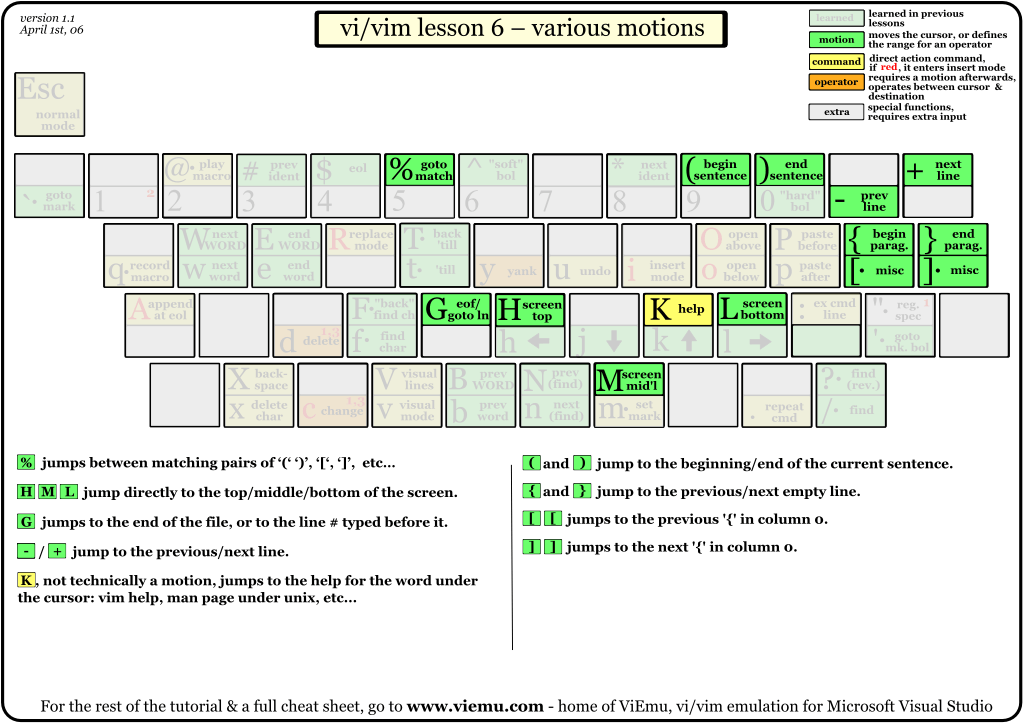
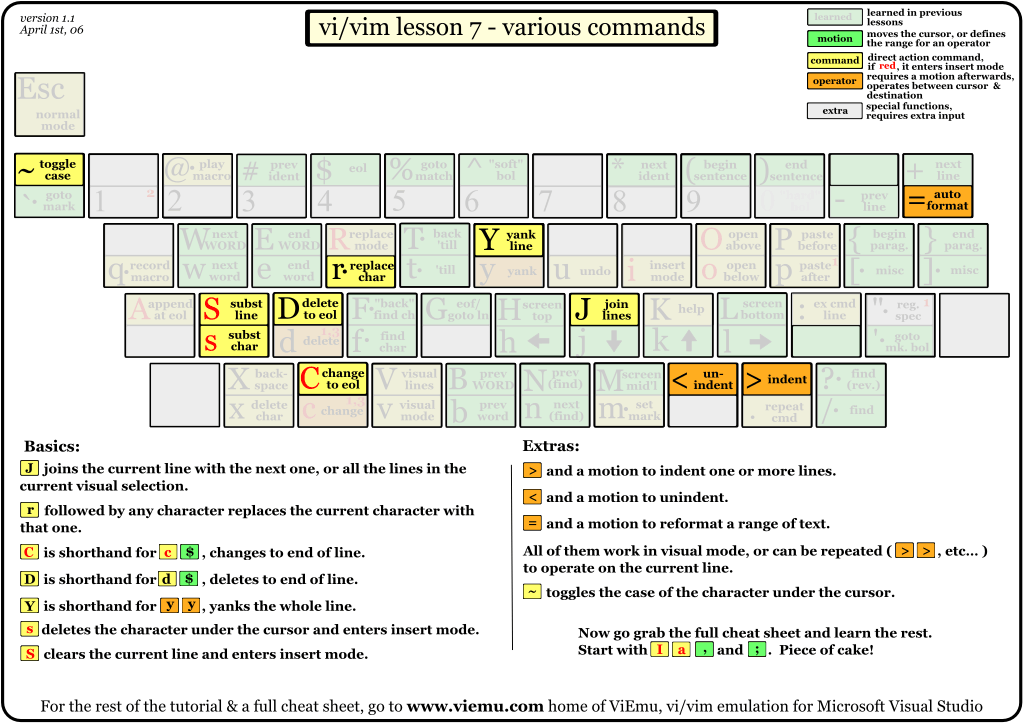
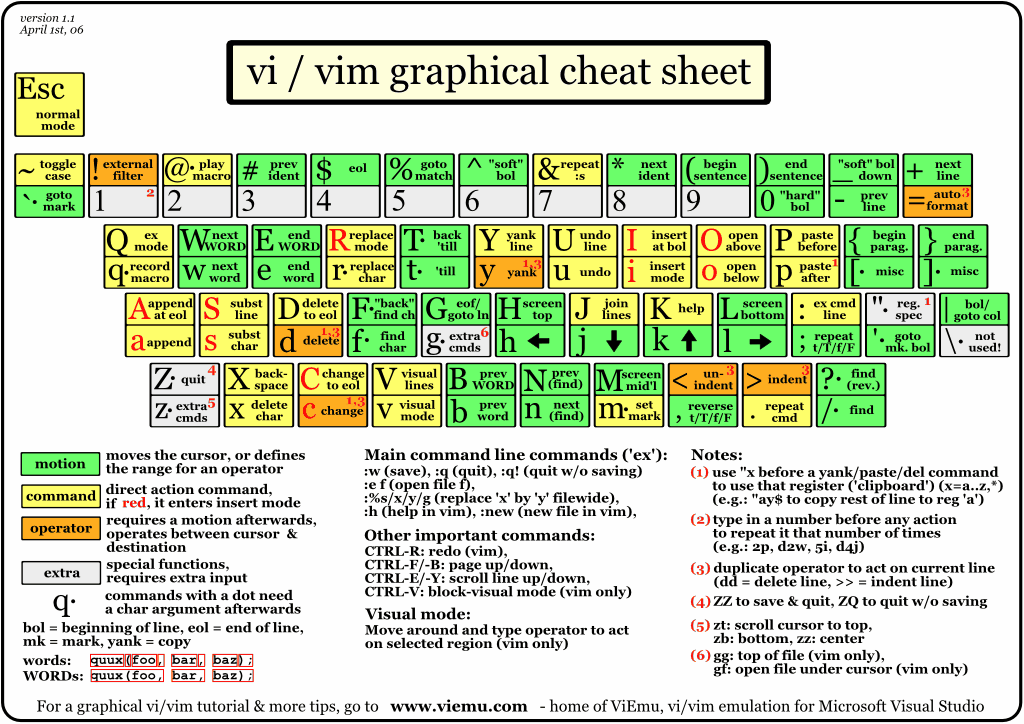
Graphical vi Cheat Sheet and Tutorial

Finally I've found it again! It's here:
http://www.viemu.com/a_vi_vim_graphical_cheat_sheet_tutorial.html

Well, actually, it's quite easy to find if one knows what to ask google about.

And I really like those pictures, they come as lessons (see below) and they finish with a final cheat sheet, ready for printing.

Lessons:

1.   2.   3.   4.

5.   6.   7.

Result (all lessons in one page):

2009-02-16

Ironic view at software diagramming

http://www.theregister.co.uk/2007/08/16/verity_stob_software_diagramming/

Somewhat funny look at different diagramming techniques over the course of years. I suspect the author's experience cannot let him feel the 'real' power of UML to use it correctly. Although UML is far from perfect, it's the best we have now (similiar to what Churchill has said about democracy).

But anyway, there is a hidden gem in the above article, a link to an open-source State Machine Compiler: http://smc.sourceforge.net/